Lumina Studio v0.1

After three years of work, Lumina Studio finally reached its first milestone. A culmination of sleepless nights, brain-itching problems, and coffee.
I was planning to make this post as an introductory blog for the engine but personally, there isn't really anyting amazing about it. True, that it is a custom game engine, but just like any other engines, it allows you to create games.
It really falls behind commercial engines and rightfully so. Game engine as a whole isn't really a solo developer endeavor. Compared to Unity, Unreal, or even Godot, Lumina Studio is pretty much rudimentary.
Core
The core is pretty much derived from Cherno's Hazel Engine. There isn't any tutorials like it. This is where I got the starting point. How to even start thinking about the architecture of the engine, and how to even start writing it.
If you do follow him and his tutorials on Hazel, you'd recognize the main entry point procedure, the application, and the layers. Beyond that is something that I have evolved throughout the years.
Launcher
Instead of starting the actual engine though:
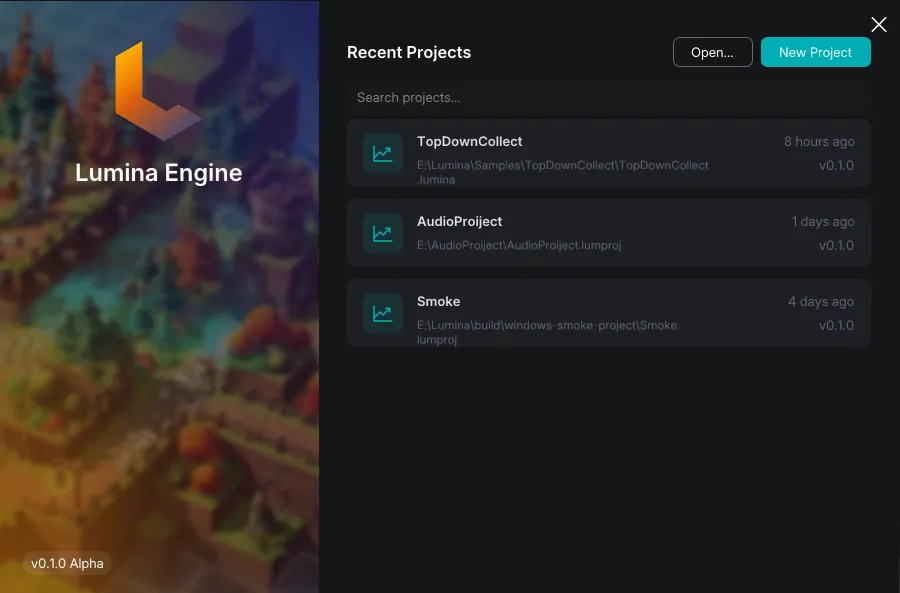
You'll be met with an OpenGL launcher that allows you to open, create, add, and delete projects.
The decision to use OpenGL for the launcher is mainly... well to not link the whole engine with the launcher and add unecessary bloat to it.
Main Window
I still use GLFW, though I did create a fork that allows me to alter it. Mainly because of the wayland and imgui issues. That was really painful to do.
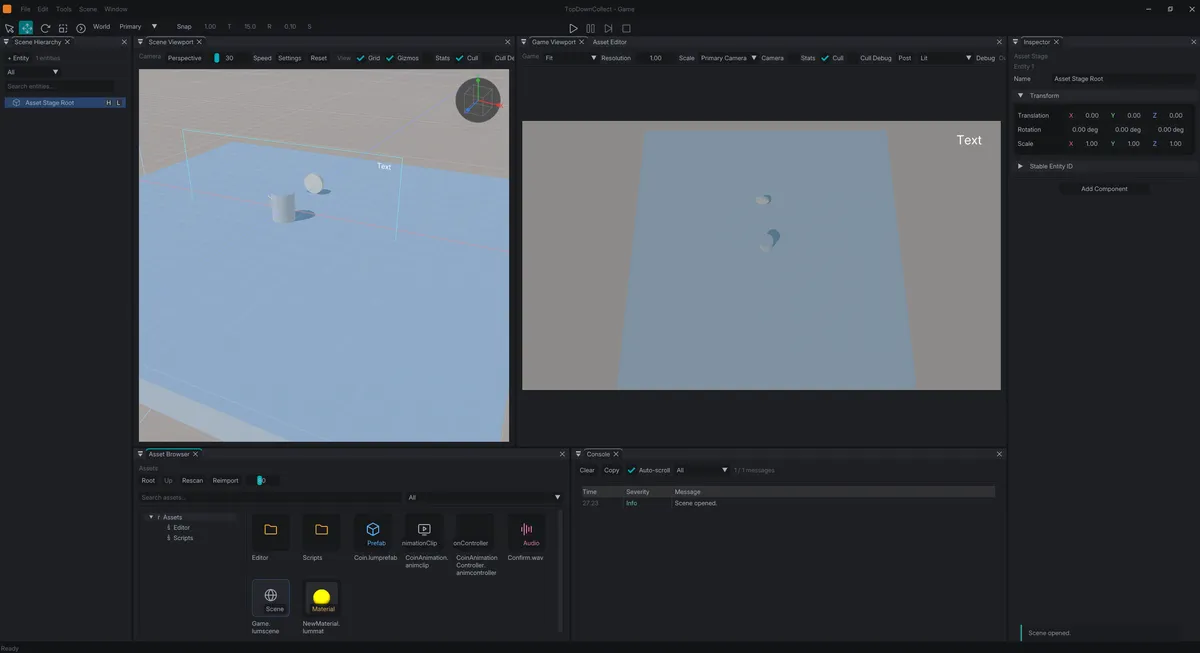
This editor was being developed in linux before and ever since the deprecation of X11, I set out to just use wayland which really didn't play too well with imgui.
Wayland doesn't joke around with security, and one of them is to just remove the capability to get window positions (or mouse, I dont' remember anymore) and this is rooted to GLFW not really supporting it when you are in Wayland.
That forced me to just go ahead to fork and add the top-drag (is what I remember that was) to GLFW. Luckily, it helped with the docking situation at least. Unfortunately though I haven't managed to find a decent fix to make viewports available in imgui. Not really that important though.
Deviation from Cherno's tutorials
One thing that I didn't follow is the inclusion of imgui in the engine because I didn't really want to use immediate mode uis in the game itself, and I wanted to pursue multithreading which I will go on during the Render Engine part of things. It would have been great, but I didn't really have any motivations to do so. So instead, imgui is only added to the editor.
Other Core Things
To put it simply, logs (spdlog), inputs (GLFW), math (GLM) all very standard. I tried doing my own math library before, it wasn't really a good idea. I wanted to do my own logs as well, again, wasn't really a good idea.
Render Engine
v0.1 has a strong Vulkan 1.3 foundation. Though I haven't explored the full features of Vulkan 1.3, I still plan on integrating most of it.
1.3 Things
Dynamic Rendering
I came from OpenGL so most of my initial implementations in Vulkan stemmed from that experience (plus the freaking boilerplates). I got to a point where I can render models, and then I find out about Dynamic Rendering. Great.
So my carefully curated frame buffer management is now irrelevant, which is actually for the better because it was increadibly. INCREADIBLY. painful to manage framebuffers. Ohhhh boy don't even get me started with resizing them.
Most of those boilerplates are gone. Finally.
Shader... what?
Shader Objects. I just read about them just before closing v0.1. I've already made shader reflections, pipeline creations etc. but hey, at least these things can be a fallback now for devices that doesn't support Shader Objects. I still think of this as a win!
The Render Engine Architecture
I've really done like countless render engines (not as big as this though), figuring out a good architecture. Since I plan on doing multi-threading (as if making this isn't hard enough), I settled on a producer-consumer architecture.
Basically the idea is, the main thread churns out frame objects, and the render thread consumes them. The caveat of this is that there will be delays when showing a render to the screen, but I guess that's what everybody do now anyways.
ImGUI Problem
Now, the problem with this is the interaction with imgui, which was initially part of the engine.
Oh it was brutal. I think I have spent weeks making imgui multithreaded. I even used my rendering engine as the rednerer for imgui, which worked, but doesn't really feel well because... immediate mode gui isn't really immediate when you do N-N+1.
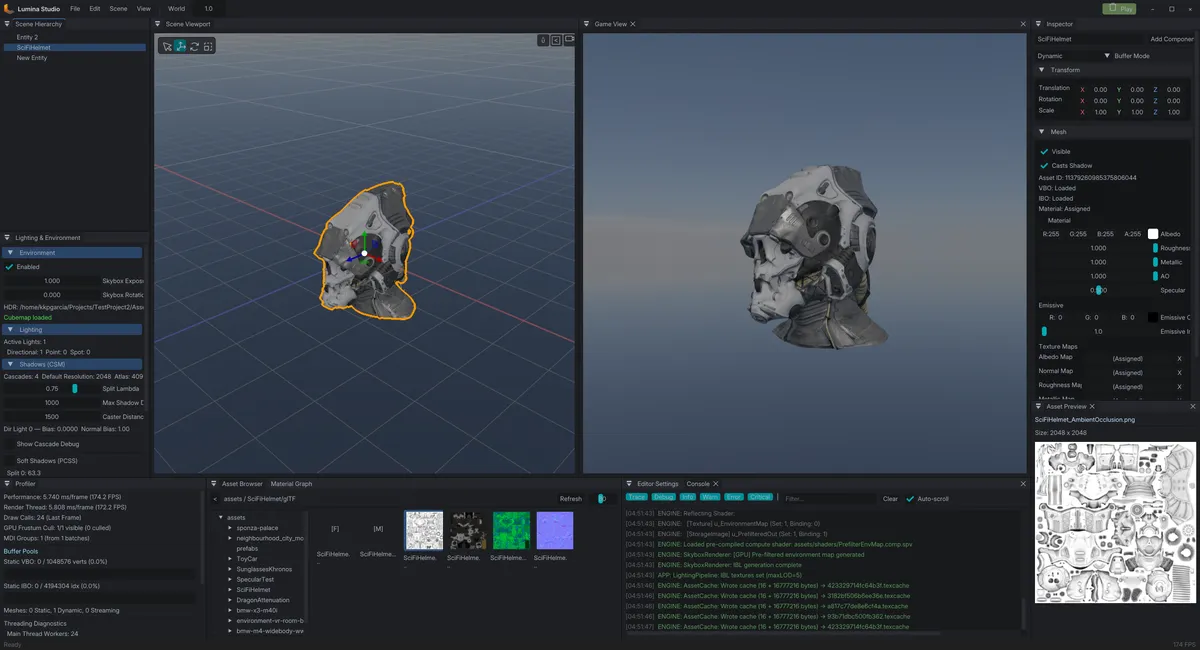
After countless of trial and error, I just then decided to pull out imgui from the engine and just exclusivly use it for the editor. This allowed me to render imgui on its own, while requesting for frames in using the engine.
This solved that nasty interaction delay when you interact with imgui.
Other notes on the Render Engine
I kept saying that it's multithreaded, but render engine isn't really multithreaded. It does have its own thread, but it deosn't have a true render thread because doing a true multithreaded rendering is a monster of its own. A true multithreaded renderer creates rendere threads, that has their own command buffers. I am not even sure what it's full requirements are, but it seems like a full render engine in a single thread, which I don't really support. Perhaps, I can venture into render threads, but when I need to I guess.
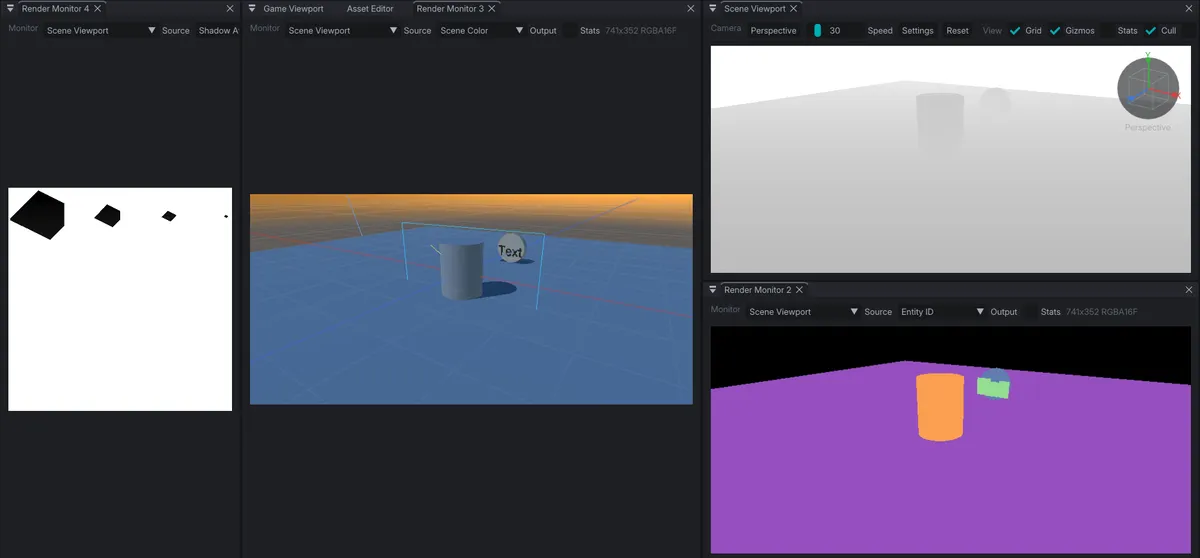
One thing that I wanted to do have is to have render debugging where I can look at the current state or outputs of some render pass (hopefully all of it though)
Asset Management
This was painful as well because it really thought me how to manage assets properly. It turns out that you're nowt really supposed to use the actual assets for the engine? Like whaaat.
Asset Pre-processing
Obviously, raw assets are too large, and too... human-readable. Engines needed somehting byte-sized (hehe), by byte-sized, I mean GPU ready assets.
Take a GLTF cube, we all can imagine how that would look like in a GLTF format (except for the binary blob of course), these needs to be converted to aleast a mesh instance that can be read by the GPU, to put it simply, an array of vertex + indices (CPU) and be converted into proper buffers later on for the GPU.
Ideally, when we talk about assets, we have a good distinction between the Disk version of the asset, the CPU (loaded in ram) verison of the asset, and GPU ready assets, and this isn't just isolated in meshes.
Asset Cache
Then I look back to Unity, and remember that it has a "Library" folder that I can delete, re-import, etc. this really clicked on me that in order to have faster asset loads (to the scene editor), I needed to have the same mechanism as Unity where I can iterate all my assets, and pre-process them into CPU ready assets (for some of them depending on the use).
This played really well when dropping meshes to the scene. Of course there's still the uploading of the data to the GPU, I guess the frame drop doesn't really matter at first because it would be easy to cache the data into ram when you try to load it the first time.
Unkowingly, this would yield great rewards later on when I started building the project.
Asset Staging
I truely liked it when Unity came up with the prefab editing mode. It was nice to isolate a prefab to its own scene editing window, but I didn't want it to be the same scene editor as the one that I do my levels with.
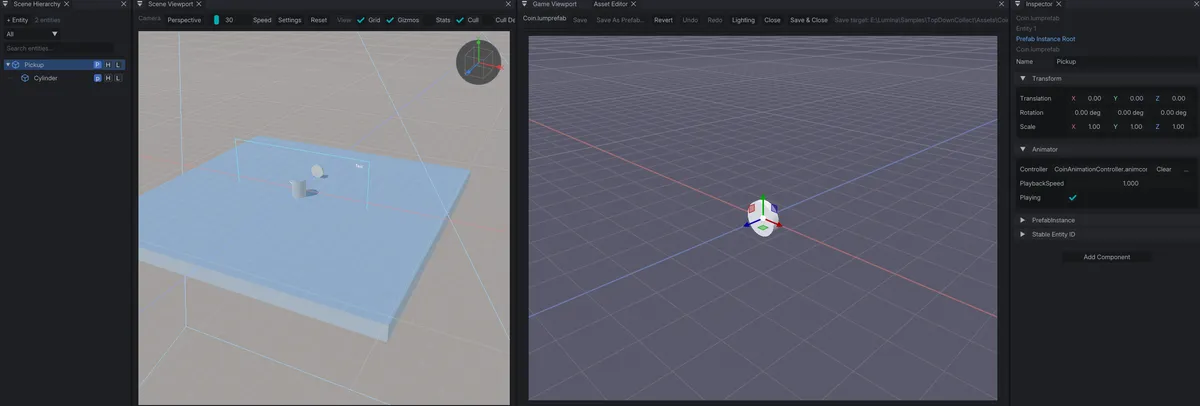
I have a special window purely for asset editing. The difference here I guess would be this is the only area where you can create animations too.
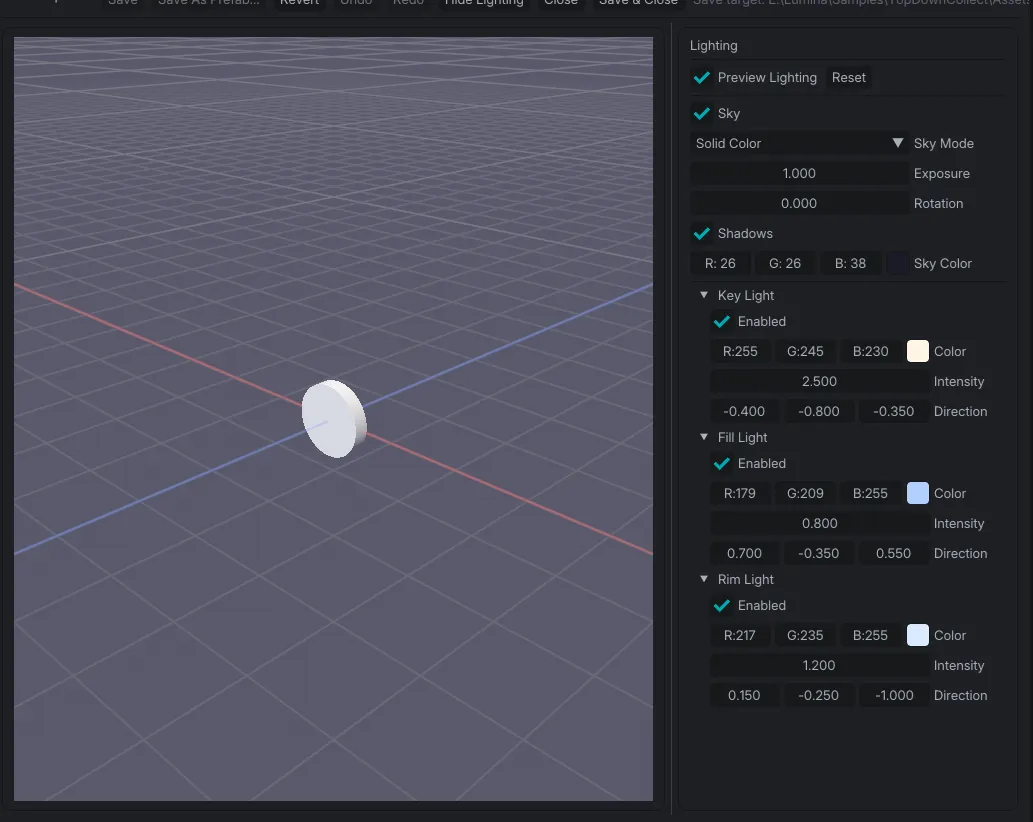
Along with it, is an isolated lighting settings to test how it will react to different lighting conditions
Hierarchy is contextual as well, if you have the asset editor focused, then the hierarchy shows that scene, and if I have the scene editor focused, then the hierarhcy shows that intead.
It was an interesting process because I had to shift my editing state to allow multiple scenes to be edited at the same time. I mentioned the hierarchy, but gizmos too had to be "contextualized". Even the play mode.
Play/Edit Mode
This is an interesting problem because, how does one think about play mode? I didn't really plan for it, all I know is that all the systems (ECS) just had to run, but then problems started to pile up and it all boils down the the state of the objects when switching between play and edit mode.
Pure Luck
It was a pure luck that I already had an existing solution that fits exactly this. My rendering pipeline takes snapshots of the scene, and builds a render frame before being passed to the render engine for rendering.
I had to do the same thing when clicking play, and return that snapshot when going back to the edit mode.
Inspection
Inspecting objects/assets is simply done through a SelectionService. It takes in a UUID and a type, and gathers that selection and iterate through its properties. Components for the objects, and metadata + import options for the assets.
Widgets
To keep a constant design thorughout the editor, I make use of widgets and reuse those for the final drawing of UI. Really, nothing much to talk about it.
Import Options
Different assets obviously calls for different importers, it's just an exposed settings to the inspector, nothing really big there.
Saving the asset re-imports them and updates the library cache too.
Building and Exporting
I couldn't think of any other way to make a standalone executable, than making an actual C++ application that takes in the project and its asset. I just had to make a similar loading process when loading a project in the editor, and strip down all the UIs involved and just do a play mode.
All the three years, and sleepless nights. This is the first "game" that I have done. I have failed to cover other parts of the engine, and I really want to just continue writing, but it's getting long, and my eyes are dropping. I have to get some sleep soon.